Practical guide · Updated July 27, 2026
How to publish an app to the App Store
The complete path from a reproducible iOS build to App Store Connect metadata, TestFlight, Apple review and a monitored public release.
The shortest complete path
- Enroll the correct person or legal entity in the Apple Developer Program.
- Create an explicit App ID, permanent bundle identifier and App Store Connect record.
- Build with the currently required Xcode and Apple SDK.
- Archive, sign and upload a reproducible production build.
- Complete product-page metadata, privacy and compliance information.
- Test the signed build through TestFlight on real devices.
- Provide complete App Review access and submit the correct items.
- Choose the release option and monitor production health.
The binary is only one part of the submission. Apple reviews the signed application, metadata, business model, user access and compliance information together.
Enroll the correct legal owner
The Apple Developer Program account should belong to the person or organization that owns the product and will control it after launch.
- Use an Apple Account controlled by the owner or company
- Enable two-factor authentication
- Make sure legal names and addresses match official records
- Use Organization enrollment when the company should appear as seller
- Keep the Account Holder role with a durable internal owner
- Complete agreements, tax and banking information before paid distribution
- Do not publish a client app under an agency or contractor account
Apple lists standard program membership at USD $99 per membership year in supported regions. Eligible nonprofits, accredited educational institutions and government entities may request a fee waiver.
Plan organization verification and D-U-N-S early
Organization enrollment requires a D-U-N-S Number associated with the legal entity. Apple also verifies that the applicant has authority to bind the organization to legal agreements.
- Check the existing D-U-N-S record before requesting a new one
- Match legal name, address and phone across business records
- Use a work-domain email and public company website
- Prepare a reference who can confirm binding authority if requested
- Respond to verification calls and document requests promptly
- Do not build a launch schedule that assumes instant enrollment
Apple notes that a new D-U-N-S record can take time to be created and then reach Apple systems. Start enrollment before the application is otherwise ready.
Assign roles without sharing credentials
App Store Connect and the Apple Developer website use roles and permissions. Invite each operator instead of sharing the Account Holder login.
Confirm access to Certificates, Identifiers and Profiles as well as App Store Connect. App access alone may not be enough to configure signing and capabilities.
Use the currently required Xcode and SDK
Apple updates minimum upload requirements. As of April 28, 2026, Apple requires iOS and iPadOS apps uploaded to App Store Connect to be built with the iOS and iPadOS 26 SDK or later. Apple points developers to Xcode 26 for the latest platform SDKs.
- Use an Xcode version accepted by App Store Connect
- Build against the required iOS SDK
- Choose a deployment target based on supported users, not the upload minimum
- Test on the newest public iOS release
- Test on the oldest supported iOS version
- Upgrade third-party SDKs that fail with the current toolchain
- Review deprecations, privacy warnings and signing changes before archive day
The SDK requirement and the minimum iOS version users can run are different settings. A new SDK does not require abandoning all older supported devices.
Create an explicit App ID and bundle identifier
The bundle identifier connects the Xcode target, App ID, provisioning, App Store Connect record, associated domains and third-party provider configuration.
- Use a reverse-domain identifier controlled by the business
- Create an explicit App ID for the production application
- Separate development and staging identifiers where both builds must coexist
- Enable only capabilities the signed product uses
- Keep the identifier consistent across Xcode and App Store Connect
- Register the production identifier with OAuth, push and analytics providers
- Do not ship a temporary identifier that the product will outgrow
Capabilities on the App ID act as an allow list, while the Xcode target and entitlements declare what the build uses. Both sides must agree.
Make signing and archives reproducible
Xcode can manage signing automatically, but the team still needs an owned and repeatable release process.
- The Xcode project selects the correct development team
- Release configuration uses production endpoints and entitlements
- Distribution certificates and provisioning are valid
- The archive builds from a clean checkout
CFBundleShortVersionStringmatches the App Store versionCFBundleVersionincreases for each uploaded build- Debug menus, development credentials and verbose logs are removed
- Archive, source revision and dSYM files are retained
If capabilities change or a distribution certificate is replaced, provisioning may need regeneration. Test an archive before the final launch window.
Create the App Store Connect record
Create the app record before uploading the first production build. Select the app name, primary language, bundle ID and SKU deliberately.
- The bundle ID matches the production target exactly
- The SKU is an internal stable identifier
- The platform and primary language are correct
- The app name is available and fits the product
- Category, content rights and age rating have an owner
- Pricing, tax category and country availability match the business plan
- Support and privacy URLs are public and durable
App Store Connect creates a numeric Apple ID for the app. Record it for analytics, campaign links, APIs and support.
Upload and process the build
Archive the Release configuration in Xcode, validate the archive and distribute it to App Store Connect. Xcode, Transporter, command-line tools or CI can upload builds.
- Confirm the archive identity, version and build number.
- Run validation and resolve signing or entitlement errors.
- Upload to the correct App Store Connect team and app.
- Wait for build processing to complete.
- Review warnings for privacy manifests, symbols and SDKs.
- Answer export-compliance questions if the build requires them.
- Select the processed build for TestFlight and the App Store version.
An uploaded build does not submit itself for App Review. It becomes an artifact that can be tested and attached to a submission.
Prepare the product page and metadata
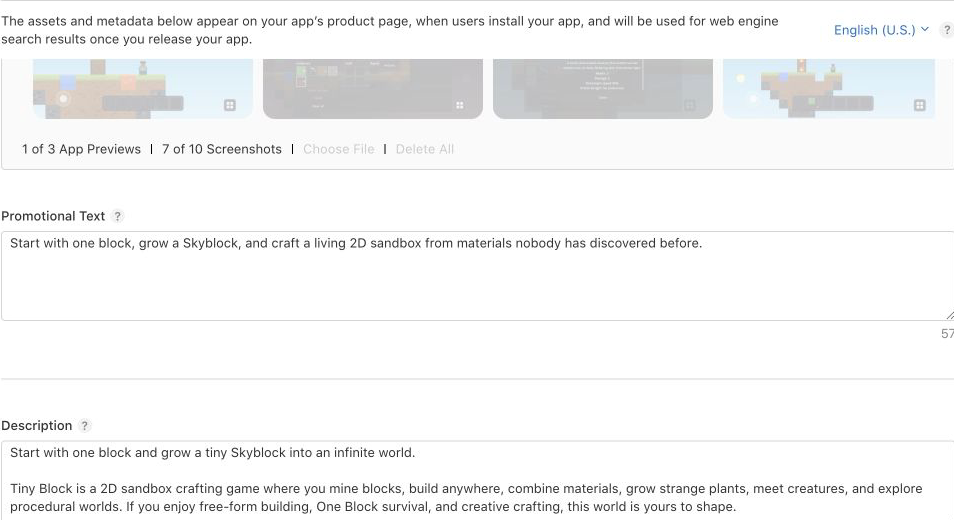
Apple currently limits the app name and subtitle to 30 characters each. The version page also includes promotional text, description, keyword field, support URL, marketing URL, copyright and release notes.
- The name and subtitle communicate a real product outcome
- The description matches features available in the submitted build
- The keyword field avoids repeated or irrelevant terms
- Support URL works without authentication
- Marketing URL is optional but accurate when provided
- Release notes describe the actual version
- Localizations are reviewed for meaning and store fit
Metadata must not promise features, prices or content the reviewer and customer cannot reach.
Create compliant screenshots and previews
Apple allows one to ten screenshots per supported device size and localization. App previews are optional. Screenshots must use accepted dimensions and cannot contain an alpha channel.
- Upload the highest-resolution required screenshots for supported devices
- Show the real application interface and current product state
- Make the first screenshots explain the primary outcome quickly
- Keep captions legible on the physical screen size
- Do not imply unavailable hardware, features or pricing
- Provide iPad screenshots when the build supports iPad
- Check localized assets in Media Manager
- Remember that changing approved screenshots requires an editable version state or a new version
The listing is both acquisition material and review evidence. It should represent the signed product accurately.
Separate App Privacy answers from privacy manifests
Apple has two related but different privacy surfaces.
PrivacyInfo.xcprivacy inside the app or SDKApp Privacy must include data collected by the app and integrated third-party partners. Privacy manifests support supply-chain transparency and required-reason API declarations, but they do not automatically complete the public App Privacy form.
Audit SDKs and privacy manifests
Starting February 12, 2025, Apple requires valid privacy manifests for a set of commonly used third-party SDKs in submitted apps. Invalid files can cause App Store Connect rejection before human review.
- Inventory analytics, ads, attribution, authentication, payments and support SDKs
- Update SDK versions that lack required manifests or signatures
- Generate the Xcode privacy report and inspect aggregated declarations
- Declare required-reason API use accurately
- Remove SDKs that are no longer needed
- Check whether any SDK contacts tracking domains
- Keep App Privacy answers consistent with actual SDK behavior
- Resolve upload warnings before selecting the final build
Complete App Privacy and tracking choices
Provide a public privacy policy URL and describe each data type collected by the app or third-party code. For each type, App Store Connect asks about purpose, linking to identity and tracking.
- Map network behavior and backend storage before answering
- Include data collected after login as well as before login
- Include analytics, ads, crash reporting and customer-support tools
- Distinguish collection from temporary processing where Apple definitions allow
- Use AppTrackingTransparency before tracking users or accessing the advertising identifier
- Provide a privacy-choices URL when it helps users manage their data
- Update responses when the shipped data practice changes
The privacy policy, consent interface, manifest and App Store nutrition label should describe the same production system.
Implement account deletion and login correctly
If the app supports account creation, Apple requires users to be able to initiate account deletion inside the app. Deleting local state or merely offering logout is not account deletion.
- Deletion is discoverable inside account settings
- The user receives clear information about the effect and timing
- Authentication, application data, files and connected processors are included
- Legal retention exceptions are explained accurately
- Failed deletion requests are recoverable through support
- The reviewer account can exercise or understand the flow safely
If the app uses a third-party or social login as the primary authentication mechanism, review the current App Review rule for offering an equivalent login option with Apple-required privacy characteristics. Do not add Sign in with Apple as an isolated button without testing account linking, hidden email addresses and deletion.
Review permissions and minimum functionality
Ask for device access only when the user reaches a feature that needs it. Provide a useful denied state wherever possible.
- Usage-description strings explain the real reason for access
- Camera, microphone, photos, location and notifications are requested contextually
- The app remains usable when optional access is denied
- Background modes and sensitive entitlements have a core product reason
- Deep links, universal links and return paths are tested
- Keyboard, safe areas, dynamic text and accessibility work on real devices
Apple’s Minimum Functionality guideline says an app should offer lasting utility and more than a repackaged website, marketing page or collection of links. A web-based runtime can be valid, but the installed experience still needs complete, useful product functionality.
Classify payments before submission
Apple payment rules depend on what the customer buys and where it is consumed.
- Create products and subscriptions in App Store Connect
- Map product identifiers to durable server entitlements
- Implement purchase, pending, cancellation and failure states
- Restore purchases after reinstall and on another device
- Process renewal, expiry, refund and revocation
- Make review products and credentials available
- Submit associated in-app purchases when required
Use the in-app purchases guide for implementation details.
Determine export compliance
Apps that use or contain encryption must answer export-compliance questions. Standard operating-system encryption can be exempt from documentation, while proprietary or non-standard cryptography can require additional review.
- Inventory application and third-party encryption use
- Answer App Store Connect questions from the actual build
- Add the appropriate
ITSAppUsesNonExemptEncryptionvalue when justified - Upload documentation before TestFlight or App Review when required
- Retain an approved compliance code where Apple provides one
- Do not copy an exemption answer from an unrelated application
Export classification is a legal determination. Escalate unusual cryptography or regulated distribution to qualified counsel.
Test the signed build through TestFlight
TestFlight proves more than simulator or local development. It exercises Apple’s signing, processing, receipt and installed-app environment.
- Test clean install, upgrade and session restoration
- Exercise login, logout, password reset and account deletion
- Test purchases, restore, refunds and expired access
- Verify push, deep links, permissions and external-return paths
- Test offline, slow-network and backend-failure states
- Review crashes and feedback by build number
- Use real devices across supported screen sizes and iOS versions
Prepare complete App Review information
App Review information is private metadata that helps the reviewer reach and understand the product.
- Current contact name, phone and email
- A durable demo account or approved fully featured demo mode
- Any PIN, sample QR code, hardware or organization membership needed
- Exact steps to reach non-obvious features
- Explanation of the business model and paid functionality
- Notes for location, background, camera or other sensitive behavior
- Specific description of new features and changes
- Backend services kept live for the entire review period
Apple’s guidelines require final, complete builds and functional URLs. Generic review notes delay review and make a correct implementation harder to verify.
Submit the correct items for review
Select the processed build on the version page, complete all required fields and use Add for Review. Then inspect the draft submission and choose Submit for Review.
- The correct build number is attached
- App version metadata is complete
- In-app purchases or subscriptions needed for the flow are submitted
- Age rating, content rights and availability are set
- Privacy and export-compliance items are complete
- Review credentials work against production
- The chosen release option matches the launch plan
Submission status moves through Ready for Review, Waiting for Review, In Review and an accepted or issue state. Reply to App Review inside App Store Connect with evidence tied to the exact guideline and build.
Choose manual, automatic or scheduled release
For each platform version, App Store Connect supports manual release, automatic release after approval, or automatic release no earlier than a selected date.
Apple notes that a released version can take up to 24 hours to appear. A scheduled date does not guarantee review completion before that date.
Use phased release for updates, not the first version
Apple phased release gradually distributes a version update to users with automatic updates over seven days: 1%, 2%, 5%, 10%, 20%, 50% and 100%.
- Phased release applies to updates, not the first version
- Users can still manually download the update at any time
- The rollout can be paused for a total of up to 30 days
- Monitor crashes, conversion, support and backend compatibility by version
- Pause when impact crosses a defined release criterion
- Ship a corrected version when the binary is defective
Phased rollout limits automatic-update exposure. It is not a substitute for backwards-compatible APIs or a rollback plan.
Monitor the public release
Approval is not the end of release operations. Watch the first days for devices, accounts and network paths TestFlight did not reproduce.
- Crash-free users and sessions by version
- Launch, hang and responsiveness signals
- Onboarding, activation and purchase conversion
- Authentication and API failures by reason
- Purchase-to-entitlement mismatches
- Push delivery and deep-link destination success
- Ratings, reviews, refunds and support themes
- Adoption of the new version and compatibility with older clients
Use the mobile app monitoring guide to define dashboards, alerts and release criteria before launch.
App Store publishing checklist
- The correct person or legal entity owns the developer account
- Membership, agreements and required business modules are active
- Roles are assigned without credential sharing
- The build uses the currently required Xcode and iOS SDK
- Bundle ID, App ID, capabilities and entitlements agree
- The archive is reproducible and source-linked
- Metadata and screenshots match the signed product
- Privacy policy, App Privacy and manifests are consistent
- Account deletion and login choices meet current rules
- Permissions and minimum functionality are justified
- Payments use the correct Apple or external path
- Export compliance is answered from actual encryption use
- The TestFlight build passed real-device lifecycle testing
- Review access and notes let a new reviewer reach every feature
- Release timing, monitoring and response ownership are documented
Apple Developer and review FAQ
How much does Apple Developer membership cost? Apple lists the standard program at USD $99 per membership year in supported regions.
Do I need a D-U-N-S Number? Organizations do; individual enrollment does not.
How long does App Review take? Apple currently says 90% of submissions are reviewed in less than 24 hours on average, but incomplete or complex submissions can take longer.
Can review be expedited? Apple provides an expedited-review request path for qualifying urgent circumstances, but approval is discretionary.
Can I upload with an older Xcode? Only if it still satisfies Apple’s current minimum upload requirements. As of April 28, 2026, iOS uploads must use the iOS 26 SDK or later.
Can the first release be phased? No. Phased release applies to version updates.
Where do I see review state? App Store Connect shows app, version and submission statuses and provides the App Review conversation.